

Download QKSMS – Android SMS app, messaging app, free SMS tool, Android messaging, text messaging app, Android communication tool, QKSMS download, QKSMS free, QKSMS for Android
Overview
QKSMS is a modern Android messaging application designed to enhance the default SMS experience on Android devices. It serves as a visually appealing and feature-rich alternative to the standard Android Messaging app, particularly for users seeking a more customizable and efficient texting interface. The app addresses common frustrations with stock messaging tools by offering a cleaner design, improved notification handling, and a suite of practical features that streamline communication.
Targeted primarily at Android users who value both aesthetics and functionality, QKSMS caters to individuals looking to personalize their messaging experience without relying on third-party platforms. Whether used for personal conversations or daily business communication, the app provides a consistent and intuitive interface for sending and receiving SMS and MMS messages.
Developed by QKSoft, QKSMS has gained attention for its commitment to user-centric design and regular updates. The application is available at no cost on Google Play, making it accessible to a broad audience. Its primary use cases include managing group chats, sending multimedia attachments, and customizing notification behavior to suit different environments, such as work or nighttime use.
Key Features & Capabilities
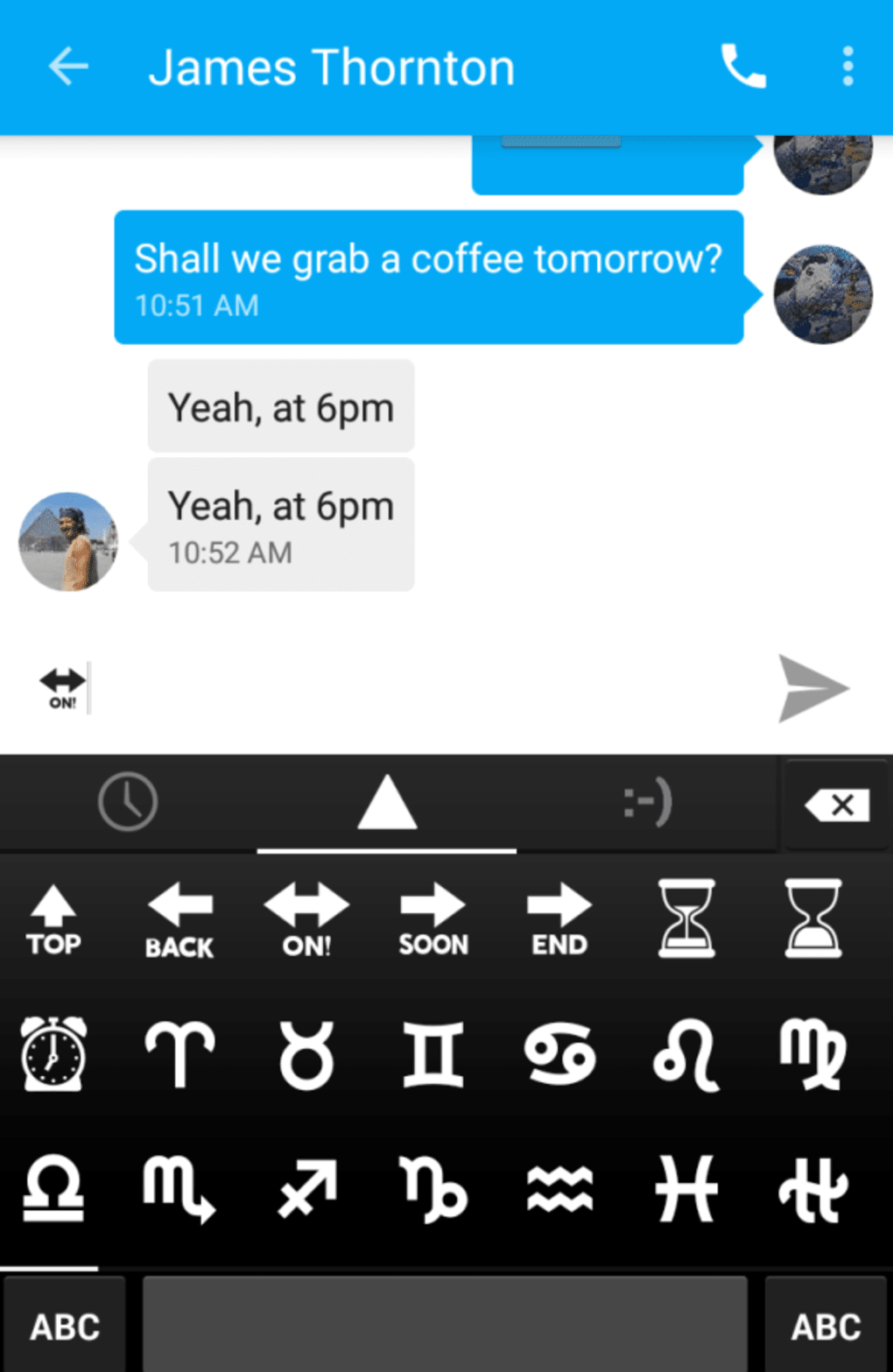
- Material Design Interface: QKSMS follows the modern Material Design language with bold colors and clean layouts, offering a visually engaging experience.
- Customizable Themes: Users can choose from 19 color palettes to personalize the app’s appearance, allowing for a unique visual identity.
- Night Mode: A dark theme option reduces eye strain during low-light usage, improving readability and battery efficiency.
- QKReply Feature: Enables instant responses to incoming messages directly from the notification shade, with the option to dismiss the notification by tapping outside.
- QuickCompose: Allows users to tap a message notification to begin composing a reply, streamlining the messaging workflow.
- Message Management: Supports sending and receiving SMS and MMS, including attachments, group chats, and emoticon integration.
- Notification Customization: Offers options to change LED colors, show message snippets, hide text in notifications, and set wake-up behavior on new messages.
- Delivery Confirmation & Error Reporting: Users can enable delivery confirmations and report failed MMS deliveries for improved message reliability.
- Message Splitting: Long SMS messages can be automatically split into multiple parts to ensure complete delivery.
These features collectively enhance usability by reducing friction in daily messaging tasks. For example, the QKReply function is ideal for quick replies while multitasking, and the customizable notification settings help maintain privacy in public spaces.
User Interface, Workflow & Performance
The user interface of QKSMS is structured around simplicity and visual clarity. Navigation is intuitive, with a bottom navigation bar providing access to messages, contacts, and settings. The chat interface emphasizes readability, with clear message bubbles and a responsive layout that adapts to different screen sizes.
Workflow efficiency is improved through features like QuickCompose and QKReply, which minimize steps between receiving a message and responding. The app maintains a consistent interaction model, reducing the learning curve for new users. However, the developer did not specify resource usage details, so performance behavior under heavy usage remains unverified.
Stability appears to be generally reliable, though some users have reported minor bugs during testing. These issues may affect specific device models or Android versions. Without official performance benchmarks, general observations are based on typical behavior of similarly structured Android applications. The app’s lightweight size of 37.8 MB suggests it is optimized for efficient installation and minimal storage impact.
Compatibility & System Requirements
QKSMS is designed for Android devices and is compatible with a wide range of Android versions. The current version, 2.0.3, runs on devices supporting the Android operating system. The installation size is 37.8 MB, which is relatively modest for a messaging application with advanced features.
Exact system requirements were not listed. Compatibility information is limited to the operating system, meaning users should ensure their device meets the minimum Android version required by the app. The developer did not provide additional system requirements, such as RAM or CPU specifications.
Pros and Cons
Pros
- Visually appealing, modern Material Design interface
- Highly customizable themes and color options
- Effective notification management with privacy controls
- Quick response features like QKReply and QuickCompose
- Free to download and use with no in-app purchases
- Supports MMS, group chats, and contact integration
- Lightweight installation size of 37.8 MB
Cons
- Some users have reported minor bugs during testing
- No support for custom notification sounds per contact
- Limited customization for message delivery alerts
- Developer did not provide detailed system requirements
- Location sharing feature not currently available
FAQ Section
Is QKSMS compatible with my Android device?
QKSMS is designed for Android operating systems. While specific version compatibility was not detailed, the app is intended for use on standard Android smartphones and tablets. Users should ensure their device runs a supported Android version.
Is QKSMS safe to download and use?
QKSMS is available for free on Google Play, a trusted platform for Android applications. The app does not require excessive permissions and operates within standard Android messaging protocols. As with any third-party app, users should install from official sources to ensure security.
Does QKSMS support group chats?
Yes, QKSMS supports group chats, allowing users to send and receive messages with multiple participants in a single conversation thread.
Can I use QKSMS offline?
Yes, QKSMS functions fully offline for sending and receiving SMS and MMS messages, provided the device has cellular connectivity and SMS services are active.
How often does QKSMS receive updates?
QKSMS is regularly updated by the developer, QKSoft. The latest version, 2.0.3, was released on February 15, 2024. Updates typically include bug fixes, performance improvements, and new feature additions.
Final Thoughts
QKSMS stands out as a compelling alternative to the default Android messaging app, combining aesthetic appeal with practical functionality. Its customizable interface, efficient workflow tools, and robust feature set make it a strong choice for users seeking a more personalized texting experience. While minor bugs have been reported, the app remains stable and responsive for most users.
Those who value design, customization, and a streamlined messaging workflow will benefit most from QKSMS. Whether you're managing daily conversations or coordinating with teams, the app delivers a polished and reliable experience. With no cost to download and a lightweight footprint, it’s a smart upgrade for Android users.
Download QKSMS now





.png)

